
Basketball Play Designer
Draw passes, dribbles, cuts and screens on a half or full court, numbered in order.
Recent
Your last 10 settings, saved only in this browser. Nothing is uploaded.
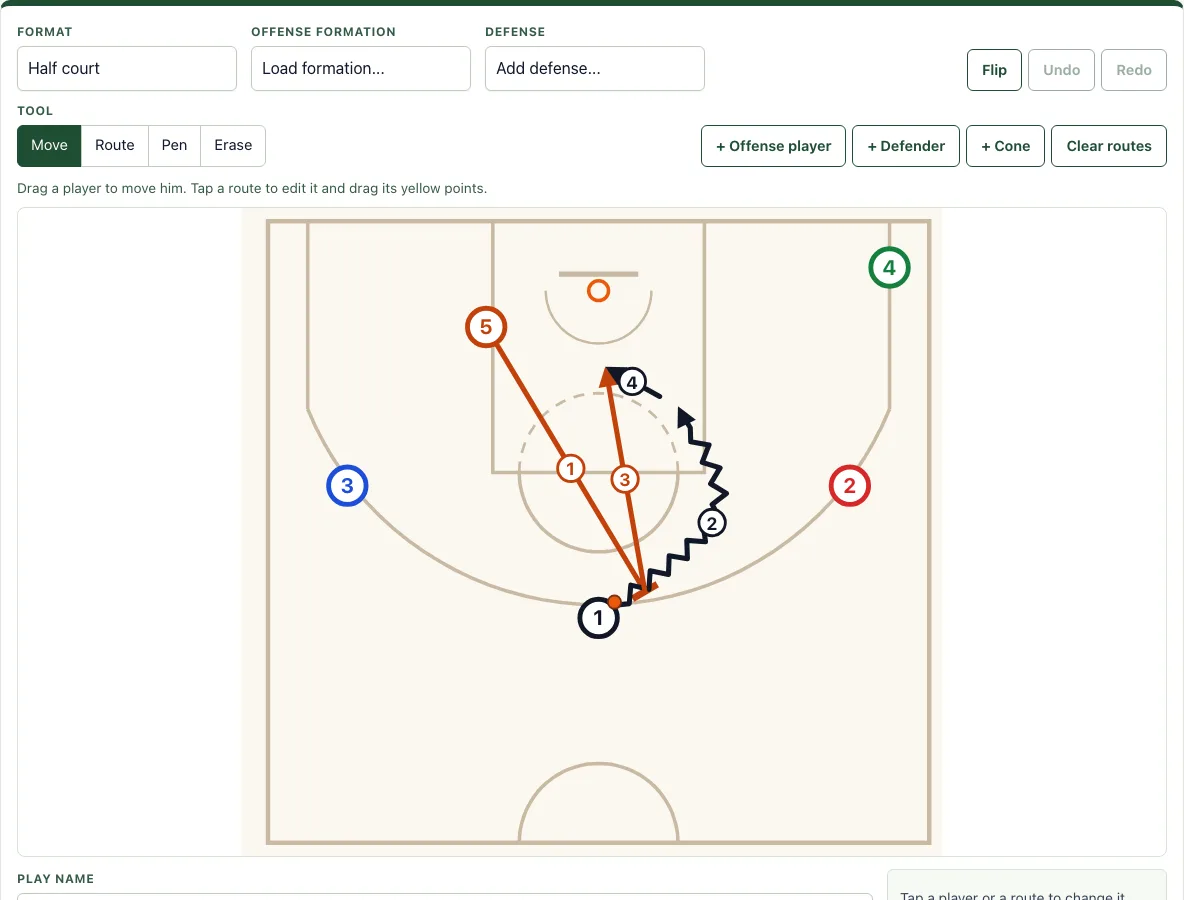
How to use the Basketball Play Designer
- Open Format and choose Half court or Full court.
- Pick an Offense formation (for example 5-out, Horns or Box) and a Defense (for example Man to man or 2-3 zone).
- Add players with + Offense player and + Defender. Use + Cone to mark a spot.
- Select Move and drag each player to where he starts. Drag a route’s yellow points to adjust it.
- Select Route, tap a player, then tap each point where his route goes. Double-tap or press Enter to finish. Press Esc to cancel.
- Use the line types Cut, Dribble, Pass, Screen or Handoff to show each action.
- Tap a selected player to give him a new label of up to 3 characters and a color. His routes take the same color.
- Use Pen for freehand drawing and Erase to remove any player, route or drawing.
- Draw the actions in the order they happen and write the order in Coaching notes; the library plays, like the Pick and Roll example, show their order with small numbers on each line.
Use Flip, Undo and Redo to test changes quickly. Ctrl or Cmd+Z undoes, Ctrl+Y or Shift+Ctrl+Z redoes, and Delete or Backspace removes the selected player or line. When a play is ready, Copy link creates a link that rebuilds the exact play, and New play clears the board. Every play in the site’s play library has an “Open in the designer” link, so you can load it and edit it here.
How do you draw a basketball play?
Start with the court, then place the players, then draw each action in order. The court is drawn from the NBA court diagram at 94 by 50 feet, with a 16-foot-wide lane, a free-throw line 15 feet from the backboard, a three-point line at 23 feet 9 inches (22 feet in the corners) and a 4-foot restricted area. Set your starting positions first, because every route begins from a player’s spot on the court.
Next, draw one action at a time, in the order the play unfolds: the first pass or screen, then the cut that follows it, and so on. The Pick and Roll example shows this: 5 screens for 1 at the top, 1 dribbles right off the screen, 5 rolls to the basket, and 1 passes to 5, with each action numbered in that order. Numbering keeps a long play easy to read and easy to teach.
What do the symbols in a basketball play diagram mean?
Each symbol shows a different type of movement. A solid arrow is a cut, a zigzag arrow is a dribble, a dashed arrow is a pass, and a line ending in a T is a screen. Handoff has its own line type, so it is not confused with a pass or a screen.
Players are labeled by position. Offensive players are numbered 1 to 5, where 1 is the point guard and 5 is the center. Defenders are labeled X1 to X5 so you can match each defender to the offensive player he guards. An orange dot marks the ball, which lets you see at a glance who has it at each step. Colors help you separate players or sets of plays, and routes take the color of the player they belong to.
Defenders added with Defense stand between their man and the basket for man to man, or in the zone spots for a 2-3, 3-2, 1-3-1 or Box and 1.
Frequently asked questions
Is it free and do I need an account?
Yes, the Basketball Play Designer is free. You do not need to sign up or create an account to use it. Plays you save with “Save in this browser” stay on that device only, in your browser’s storage.
Can I print it or save it as a PDF?
Yes. Use Download PDF to get one play per page, with your notes included. You can also use Print, or export the diagram as a PNG image or an SVG file.
Does it work on a phone or tablet?
Yes. You drag players with a finger and tap to draw routes; the field fits the screen width.
Can I edit a play from the play library?
Yes. Every play in the site’s play library has an “Open in the designer” link. Click it to load the play here, then change players, routes or labels as you need.
Can I draw on a full court?
Yes. Set Format to Full court for presses, transition and full-court drills. The court then shows both baskets and the centre circle, drawn from the NBA court diagram.
Can I show the ball?
Yes: an orange dot marks the player who has the ball at the start.
Related tools
- Basketball whiteboard: Use it when you want a free-form board for quick notes and sketches instead of a set play.
- Basketball plays: Browse ready-made plays when you want a starting point before you draw your own.
- Inbound plays: Use it to plan out-of-bounds sets for sideline and baseline inbounds.
- Basketball playbook: Use it to organize your plays into one collection for a season or a team.
- Basketball court diagram: Use it when you need a plain court layout to print or mark up by hand.
- Football play designer: Use it if you coach football and need to diagram plays for that sport.