
Basketball Playbook
Pick your plays, choose how many per page and download a printable basketball playbook PDF.
Recent
Your last 10 settings, saved only in this browser. Nothing is uploaded.
This basketball playbook tool lets you build a printable playbook from a library of plays and export it as a PDF. You choose the plays, put them in order, add a title and optional coaching notes, then print the result or download it. It works as a basketball playbook template you can reuse for each season or team. The tool is free, runs in your browser and needs no sign-up. Nothing you enter is uploaded. The sections below explain how to use it, what a playbook should contain and how many plays a youth team needs.
It works for half-court sets and inbound plays alike.
How to use the basketball playbook
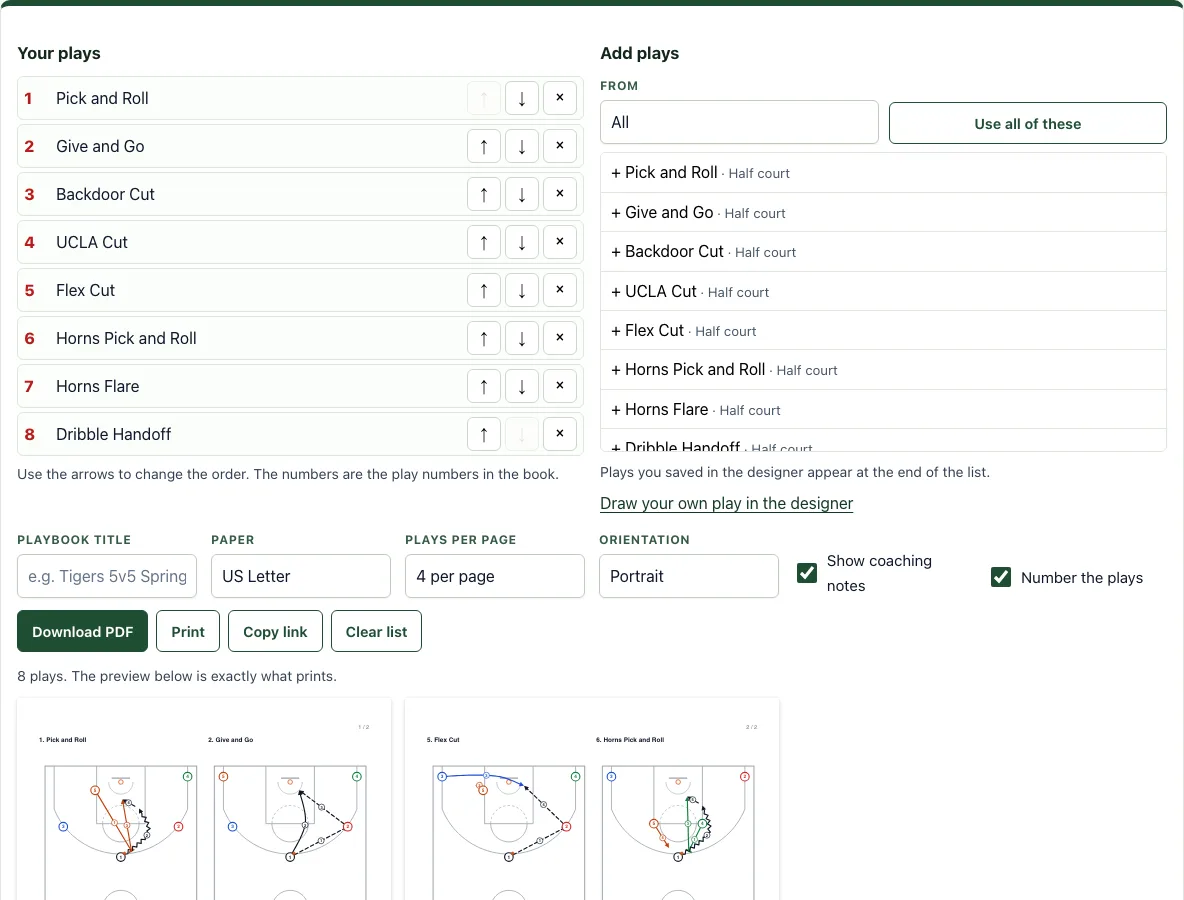
- In the Add plays panel on the right, check the From list. It starts on Half-court plays and shows the first 8. Choose Inbound plays to switch groups.
- Click the + button beside any play to add it. To add the whole group at once, click Use all of these. That adds 16 half-court plays or 8 inbound plays.
- In the Your plays list on the left, use the up and down buttons to change the order. Use the remove button to delete a play.
- Set the Playbook title, Paper (US Letter or A4), Plays per page (1, 2, 4, 6, 9 or 12) and Orientation (portrait or landscape).
- Turn on Show coaching notes and Number the plays if you want them.
- Check the preview below the buttons. It shows the exact pages that will print.
- Click Download PDF, Print, Copy link or Clear list.
Plays you draw in the basketball play designer and save in this browser appear at the end of the Add plays list. Your list is remembered in this browser for next time, and Copy link creates a link that rebuilds the whole playbook.
Plays you draw in the basketball play designer and save in this browser can be mixed with library plays in one book.
What should be in a basketball playbook?
A basketball playbook should show each play clearly enough that a player can find it, understand it and recall it under pressure. Each play needs a name, a number, a diagram of the court with player positions and movement, and short notes on who does what. Good playbooks group plays by situation, such as half-court offense, plays against a zone and inbound plays, so players know where to look.
Give each play its own diagram. Two or four plays per page are easy to read on paper; nine or twelve suit a quick reference sheet for coaches. A title, page numbers and a consistent layout help players and coaches use the book as a reference during practice.
How many plays does a youth basketball team need?
There is no fixed number, but most youth teams do better with a small set of plays they can run well than a large set they only half remember. Players learn plays through repetition in practice, so every extra play takes more time to teach. Start with a few core offensive sets, a simple inbound play and one or two defensive looks.
Add plays as your team’s skills grow. Many coaches keep a main set for regular games and a few special plays for specific moments, such as the last few seconds of a half. The library here has 16 half-court plays and 8 inbound plays, so you can choose a short list that fits your roster and age group.
Free basketball playbook: how to build one for your team
Pick a short list from the basketball plays library, add them to the playbook and put the ones you call most first. Print it or save it as a PDF; there is nothing to pay for and no account to create.
How should I order the plays?
Put the plays you call most at the front and give each one a number that stays the same all season, so players learn the numbers as well as the names. Group the half-court sets first and the inbound plays after them, and keep zone offense together, so a player looking for a baseline play knows where to turn.
Frequently asked questions
Is it free and do I need an account?
Yes, the tool is free and needs no sign-up. It runs in your browser, and nothing you create is uploaded.
Can I print it or save it as a PDF?
Yes. Download PDF creates a vector PDF that stays sharp at any size. Print sends the pages to your printer. Check the preview first, since it shows exactly what will print.
Does it work on a phone or tablet?
Yes. The lists, settings and preview stack on a narrow screen, and the PDF opens in your phone’s PDF viewer for printing.
Can I share my playbook with my team?
Yes. Click Copy link to get a link that rebuilds the whole playbook, including your title and play list; the paper and layout settings are chosen on the page. Send it to assistant coaches or players so everyone uses the same version.
Can I change the order or remove plays after I add them?
Yes. Use the up and down buttons in the Your plays list to reorder them, and use the remove button to delete any play. The preview updates so you can check the new page order before printing.
Can I use what I make here commercially?
Yes. Sheets, cards, diagrams and PDFs you make with this tool are yours to print, hand out, sell or put in your own products, such as a coaching book on KDP or a printable on Etsy, with no credit needed. You may not copy the tool or the site itself; see the terms.
Related tools
- Basketball plays for youth: Browse the simpler plays when you build a playbook for a young team.
- Basketball score sheet: Print a score sheet to keep with the playbook on game day.
- Basketball plays: Browse the full set of plays when you need to pick the ones to include in your playbook.
- Inbound plays: Use this when you want to look at out-of-bounds sets before adding them to your list.
- Basketball play designer: Draw a new play yourself when none of the library plays match what your team needs.
- Basketball court diagram: Use this to sketch a court layout for a play or a drill without building a full playbook.
- Basketball whiteboard: Open this during a practice or huddle to draw plays quickly on screen.
- Playbook maker: Try this if you are building a playbook for a different sport, such as football.