
Basketball Plays for Youth
6 simple half-court plays for young teams with numbered diagrams. Print them or edit any one.
Pick and Roll
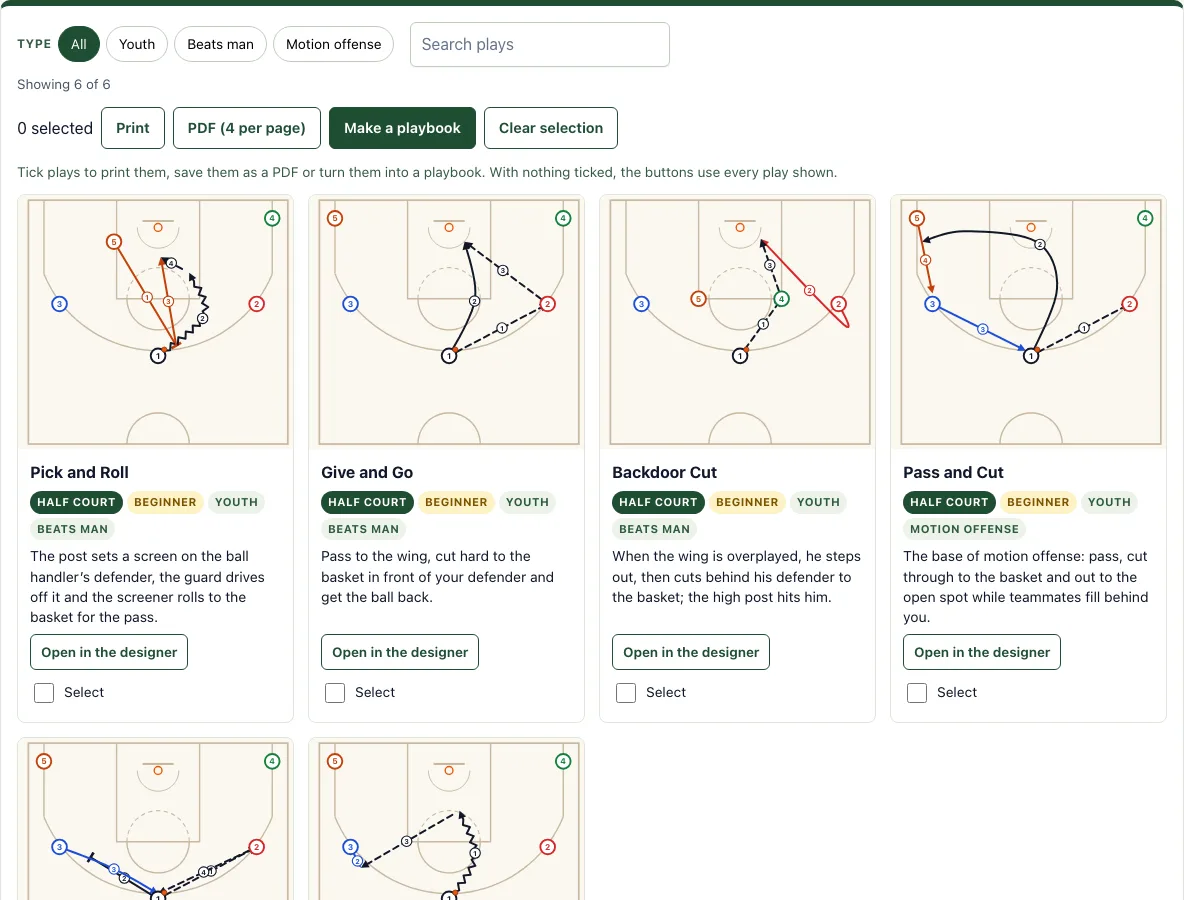
The post sets a screen on the ball handler’s defender, the guard drives off it and the screener rolls to the basket for the pass.
Give and Go
Pass to the wing, cut hard to the basket in front of your defender and get the ball back.
Backdoor Cut
When the wing is overplayed, he steps out, then cuts behind his defender to the basket; the high post hits him.
Pass and Cut
The base of motion offense: pass, cut through to the basket and out to the open spot while teammates fill behind you.
Pass and Screen Away
Pass to one side and screen for the player on the other side, who comes off the screen to the top.
Drive and Kick
The guard drives into the lane; when the help defender steps up, he kicks the ball out to the open shooter.
Recent
Your last 10 settings, saved only in this browser. Nothing is uploaded.
Youth Basketball Plays is a free tool that shows six simple half-court plays for young players, built on passing, cutting and one screen. It runs in your web browser, needs no sign-up, and uploads nothing. Each play has a diagram with numbered actions, a name and a coaching note, so you can see who moves where before you take the plays to practice.
Use it to pick a small set of plays for a team of kids, filter the list by type, print a set of cards for your bench, or start a playbook. Basketball plays for youth work best when every player understands the movement, and this page keeps the number of moving parts low. Basketball plays for 10 year olds, and other young players, can be taught from the same diagrams.
How to use the Youth Basketball Plays Tool
- Look at the count above the cards to see how many plays are shown.
- Use the type buttons to narrow the list, for example Beats man or Motion offense.
- Type a name or keyword in the search box to find a specific play, such as Give and Go.
- Read each card. The diagram shows the players, the ball and the arrows, with small numbers giving the order of the actions; the coaching note explains the idea.
- Tick the Select box on any card you want to keep together.
- Press Print or PDF (4 per page) to print or save the plays. If you have not selected any cards, both buttons use every play shown.
- Press Make a playbook to open the playbook maker with your selected plays.
- Press Open in the designer on any card if you want to change the diagram.
Printing and saving work from the same buttons, so you can prepare handouts before practice. Your ticked cards are remembered in this browser, so they are still selected when you come back.
Every card prints with its numbered diagram, and Make a playbook turns your ticked plays into a printable book.
What plays should youth basketball teams run?
Youth teams should run plays that are easy to learn and easy to repeat. The six plays on this page are built on passing, cutting and one screen: Pick and Roll, Give and Go, Backdoor Cut, Pass and Cut, Pass and Screen Away and Drive and Kick. Each has two to four numbered actions, so a player can follow the sequence without memorizing a long chain of moves.
Good starter plays share a few traits. They give the ball handler a clear first pass, they ask each player to make only one or two decisions, and they reward players for moving without the ball. Plays that depend on quick, complicated screens or many players crossing paths usually confuse beginners, so save those for later.
How many plays do kids need?
Most young teams do better with a few plays learned well than with many plays learned poorly. Start with two or three plays, run them in practice until players can explain their own job, and add new ones only after the first set feels comfortable.
What do the diagram symbols mean?
Numbered circles 1 to 5 are offensive players. Diamonds marked X1 to X5 are defenders. An orange dot marks the ball. Arrows show what each player does: solid arrows are cuts, zigzag arrows are dribbles, and dashed arrows are passes. A line ending in a T is a screen, where one player stands still to block a defender.
Small numbered circles on the diagram give the order of the actions. Follow them from 1 upward, and match each step to the coaching note on the card.
How do you teach a play to young players?
Walk it first: put five players on their spots and move through the numbered actions slowly while each player says what they do. Then run it against no defense, then against passive defenders, and only then at game speed. Print the card so players can look at the diagram between reps, and keep one simple rule for every play, such as “after you pass, cut to the basket”.
Frequently asked questions
Is it free and do I need an account?
Yes, the tool is free, needs no sign-up and runs in your browser. Nothing you do is uploaded.
Can I print it or save it as a PDF?
Yes. Press Print to print the plays, or PDF (4 per page) to save them as a PDF with four cards on each page. Select the plays you want first, or leave the selection empty to print or save every play shown.
Does it work on a phone or tablet?
Yes. The play cards stack in one column on a phone, and Open in the designer lets you change any play with your finger.
Are these the same plays as the full basketball plays page?
Yes. These are the same diagrams used on the basketball plays page, filtered to simple plays built on passing, cutting and one screen.
Do I need a big player for these plays?
No. Every player passes, cuts and screens, so any five players can run them.
Can I add a defense to these plays?
Yes. Open a play in the designer and choose Man to man or a zone in Defense to show the defenders as well.
Related tools
- Basketball plays: Browse the full set of plays when your team is ready for more advanced options.
- Basketball play designer: Edit a diagram or draw a new play from scratch.
- Basketball playbook: Put selected plays together into a single playbook for your team.
- Inbound plays: Plan simple plays for out-of-bounds situations.
- Basketball whiteboard: Sketch ideas freely during a huddle or practice.
- Basketball court diagram: Check court markings and positions when you explain where players should stand.