
Basketball Plays
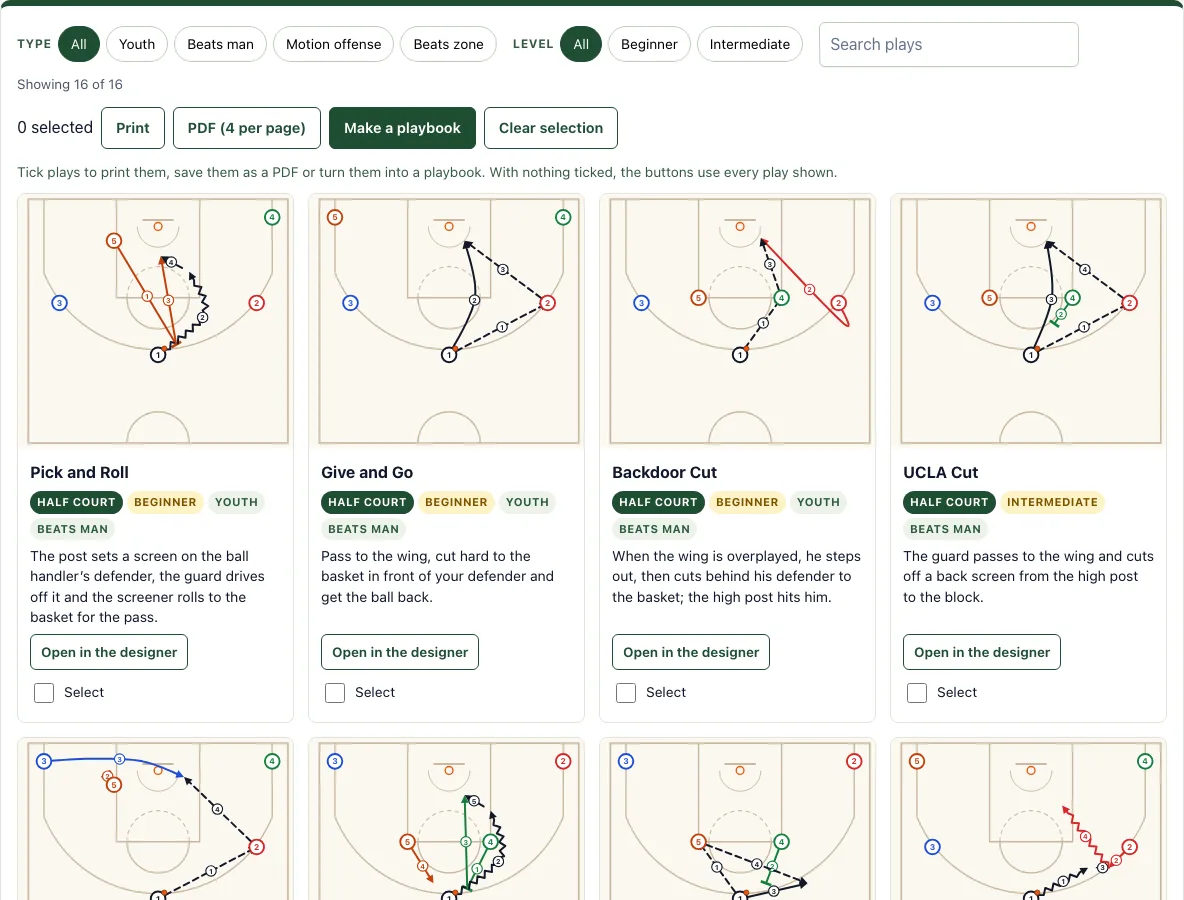
16 half-court plays with numbered diagrams and notes. Print them or open any play to edit.
Pick and Roll
The post sets a screen on the ball handler’s defender, the guard drives off it and the screener rolls to the basket for the pass.
Give and Go
Pass to the wing, cut hard to the basket in front of your defender and get the ball back.
Backdoor Cut
When the wing is overplayed, he steps out, then cuts behind his defender to the basket; the high post hits him.
UCLA Cut
The guard passes to the wing and cuts off a back screen from the high post to the block.
Flex Cut
The baseline screen: the post screens for the corner player, who cuts along the baseline to the opposite block.
Horns Pick and Roll
Both posts start at the elbows; one screens for the guard and rolls, the other pops to the top for a kick-out.
Horns Flare
The guard passes to the post at the elbow and fades behind a flare screen for a catch-and-shoot.
Dribble Handoff
The guard dribbles at the wing and hands the ball off; the wing takes it downhill with the guard’s body as a screen.
Pass and Cut
The base of motion offense: pass, cut through to the basket and out to the open spot while teammates fill behind you.
High Low
Ball to the high post, the low post seals his defender and flashes to the block for an easy pass down.
Overload vs 2-3 Zone
Put three players on one side of a 2-3 zone: wing, corner and ball-side low post. The middle defender cannot cover both the low post and the high post, where the weak-side guard arrives.
1-3-1 vs 2-3 Zone
The high post flashes down to the free-throw line gap between the two top defenders and the middle defender, takes the pass from the top, then finds the short corner.
Skip Pass vs 2-3 Zone
Swing the ball to one wing, then reverse it across the top of the zone to the other wing. The zone has to slide its whole width, and the wing shooter can get an open look.
Stagger Screen
Two screens in a row for a shooter coming from the block to the wing.
Pin Down
The post screens down for the player on the block, who pops out to the wing for the catch.
Pass and Screen Away
Pass to one side and screen for the player on the other side, who comes off the screen to the top.
Drive and Kick
The guard drives into the lane; when the help defender steps up, he kicks the ball out to the open shooter.
Recent
Your last 10 settings, saved only in this browser. Nothing is uploaded.
This page is a free library of 16 half-court basketball plays, each shown as a diagram with numbered actions and a coaching note. It runs in your browser, needs no sign-up, and is useful for coaches, players and parents who want basketball plays for beginners or basketball plays for youth teams.
Use the filter buttons to narrow plays by type (Youth, Beats man, Beats zone, Motion offense) or level (Beginner, Intermediate), or search by name. Each play card shows a diagram with every action numbered in order, the play name, its tags and a coaching note. The plays cover basketball offense plays from Pick and Roll and Give and Go to Overload vs 2-3 Zone and Drive and Kick.
How to use the Basketball Plays Tool
- Look at the count above the cards to see how many plays are currently shown.
- Tap a filter button for type or level; tap All to remove the filter.
- Type a word in the search box, such as “pick” or “zone”, to find plays by name.
- Read a card’s diagram in the order of its numbered actions, then the coaching note.
- Tap “Open in the designer” on any card to edit that play.
- Tick the Select box on each play you want to keep.
- Tap “Make a playbook” to open the playbook maker with your selected plays.
- Tap Print or PDF (4 per page) to get a printed or saved copy. With nothing selected, these buttons use every play shown.
Filters and search work together, so you can select a level and a type at the same time. Selecting plays before printing lets you choose exactly which pages go to paper or PDF.
The plays you tick stay ticked in this browser, so you can come back later and print the same set. Open in the designer loads the play into the basketball play designer.
Each card prints with its numbered diagram and note.
What are simple basketball plays?
A simple basketball play is a planned set of passes, cuts and screens that moves the defense so one offensive player gets an open shot. Plays work because defenders have to react to movement, and a single late or wrong reaction leaves someone open.
Every diagram on this page uses the same key. Circles numbered 1-5 are offensive players, and diamonds X1-X5 are defenders. An orange dot marks the ball. Solid arrows are cuts, zigzag arrows are dribbles, and dashed arrows are passes. A line ending in a T is a screen. Small numbered circles show the order of the actions, so read the diagram in that order.
Beginners should start with plays tagged Youth, such as Give and Go, Backdoor Cut, Pass and Cut and Drive and Kick. They teach the core habits: passing to a moving teammate, cutting at the right time and using a screen.
What is a pick and roll?
A pick and roll is a play where one player sets a screen on the defender guarding the ball handler, the ball handler drives off the screen, and the screener rolls toward the basket. The definition used on the cards is: a post screens the ball handler’s defender, the guard drives off it, and the screener rolls to the basket.
The play works because the defense must choose a response:
- The screened defender can switch onto the driver.
- The defender can go under the screen, giving the driver a shot from range.
- Another defender can help, which leaves a teammate open.
- Whichever choice the defense makes, the offense passes to the open player.
Open the Pick and Roll card and follow its numbered actions: screen, dribble, roll, pass.
What is a give and go?
A give and go is the simplest two-player play: a player passes to a teammate, cuts hard to the basket in front of his defender and gets the ball back for a layup. Our Give and Go card shows it from a 5-out set with the guard passing to the wing.
Frequently asked questions
What is a backdoor cut?
A backdoor cut is a cut behind an overplaying defender toward the basket. When a defender leans toward the passer to deny the pass, a teammate runs past on the backdoor side and receives the ball for an easy shot. Backdoor Cut is one of the six plays tagged Youth.
How do you beat a 2-3 zone?
Place players in the gaps of the zone, then overload one side with extra players on the wing, corner or short corner. Overload vs 2-3 Zone and 1-3-1 vs 2-3 Zone show two ways to set this up. Follow the numbered actions on each card to see where the ball goes next.
Is it free and do I need an account?
Yes. The tool is free, needs no sign-up and runs in your browser. Nothing is uploaded.
Can I print it or save it as a PDF?
Yes. Select the plays you want, then press Print or PDF (4 per page). If you select nothing, Print and PDF use every play shown on the page.
Does it work on a phone or tablet?
Yes. The play cards stack in one column on a phone, and Open in the designer lets you change any play with your finger.
Related tools
- Basketball plays for youth: Use this when you coach younger players and want only the simpler plays.
- Inbound plays: Use this when you need a set play for throw-ins from the baseline or sideline.
- Basketball play designer: Use this when you want to build or change a play from scratch.
- Basketball playbook: Use this when you want to put selected plays together into one document for your team.
- Basketball whiteboard: Use this when you want to draw ideas freely during a practice or timeout.
- Basketball court diagram: Use this when you need a blank court to sketch your own player positions.
- Football play designer: Use this if you also coach flag football and want to draw football plays with the same tools.