
Basketball Rotation Generator
Enter your players and game length to get a substitution chart with equal minutes for everyone.
Recent
Your last 10 settings, saved only in this browser. Nothing is uploaded.
How to use the Basketball rotation generator
- In Players, type one name per line. Enter between 5 and 15 players.
- Under Periods, choose 4 quarters or 2 halves.
- Enter the Period length in minutes. The range is 4 to 20 minutes.
- Set Change players every to a number of minutes from 2 to 10.
- Read the headline, “Every player gets X to Y minutes,” to see how far apart the most and least playing time are.
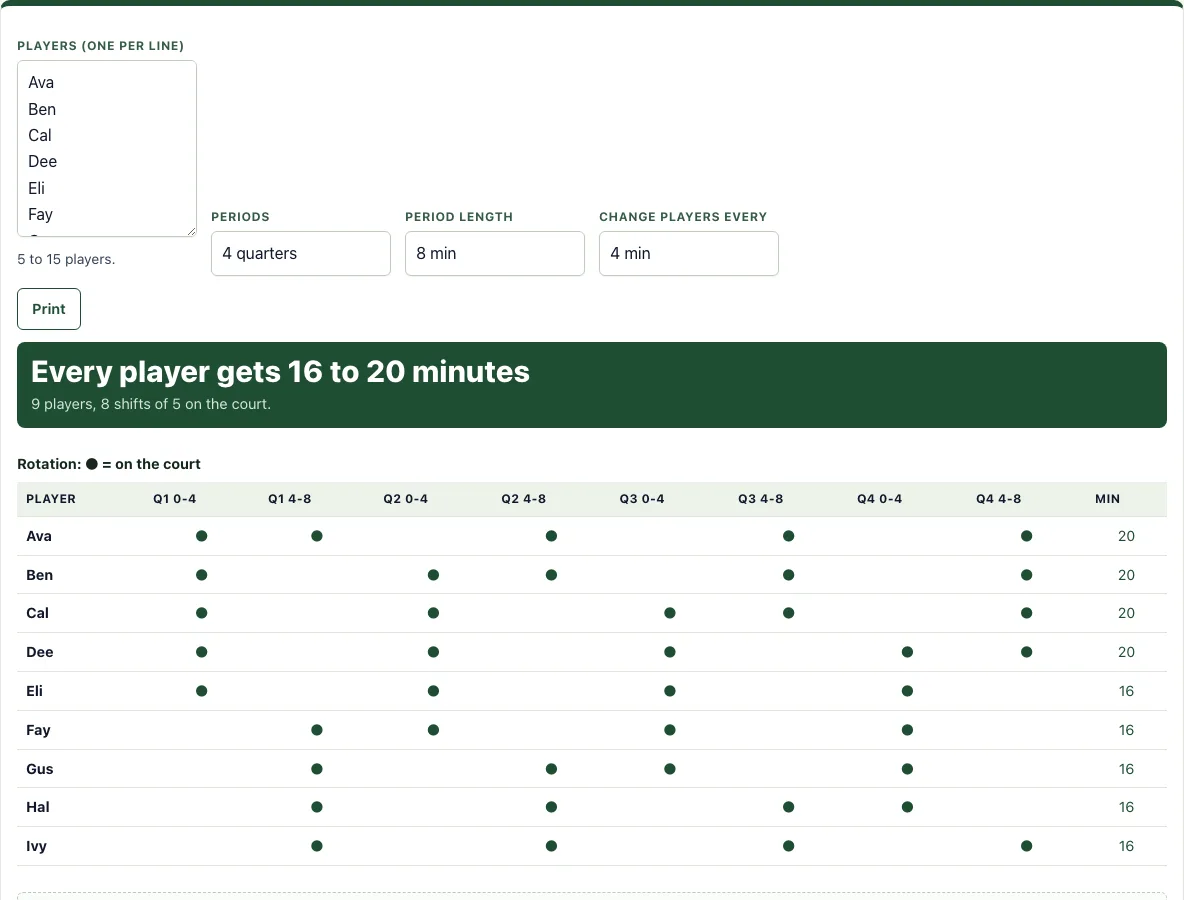
- Scan the table. Each column is one shift, labeled by period and time, such as Q1 0-4. A dot means that player is on the court during that shift. Each player’s total minutes appear in the table as well.
- Click Print to print the chart.
The chart updates as soon as you change a name or a setting. A dot (●) in a column means that player is on the court for that shift; the last column adds up each player’s minutes. Print uses a landscape page so every shift fits on one line, and the player list is remembered in this browser for the next game. If you have fewer than five names, the tool asks for more instead of making a chart.
Names can be first names, numbers or initials, and the order of the list only matters for breaking ties.
How do you give equal playing time in youth basketball?
Equal playing time comes from tracking minutes, not from guessing. At every change, the players with the fewest minutes so far go on the court, and the players with the most minutes come off.
The tool applies this rule for each shift. It puts on the five players with the fewest minutes so far. If players are tied, the one who has sat out longest goes on first, and any remaining tie is settled by list order. Because of this, the gap between the player with the most minutes and the player with the least stays at about one shift.
How often should I substitute?
Choose a change interval between 2 and 10 minutes. The interval sets the size of the gap, because the difference between players is about one shift. A 2-minute interval keeps the gap small but needs many changes. A 10-minute interval means fewer changes but a bigger gap.
How do you work out playing time for a 9-player team?
Take a 9-player team playing 4 quarters of 8 minutes, with changes every 4 minutes. That gives 8 shifts. Five players are on the court at any time, so each shift uses 4 minutes times 5 players, which is 20 player-minutes. Over 8 shifts, the total is 160 player-minutes.
Nine players cannot split 160 minutes evenly, since 160 divided by 9 is about 17.8. The tool gives four players 20 minutes and five players 16 minutes. The difference is one shift, which is 4 minutes.
If a player arrives late or gets hurt, remove or add the name to get a new chart; it plans the whole game again, so make the change at a break and follow the new chart from there.
What if the period length does not divide evenly?
Then the last shift of each period is shorter. With 10-minute quarters and changes every 4 minutes, each quarter has shifts of 4, 4 and 2 minutes, and the minutes column counts the short shifts exactly. The tool still puts the players with the fewest minutes on first, so the totals stay close.
Frequently asked questions
Is it free and do I need an account?
Yes, the tool is free and needs no sign-up. Your data is not uploaded, and everything runs in your browser.
Can I print it or save it as a PDF?
Yes. Click the Print button to print the chart. If your computer’s print window has a “Save as PDF” option, you can use it to keep a PDF copy.
Does it work on a phone or tablet?
Yes. The buttons are large enough to tap on a phone during a game, and everything stays in that phone’s browser.
What do the dots in the chart mean?
A dot marks a player who is on the court during that shift. Read down a column to see the five players for that shift, and across a row to see when a player is on the court.
Are the player names saved?
Yes, in this browser only: the list is filled in again the next time you open the page on the same device. Nothing is sent to a server.
Does it handle 2 halves?
Yes. Choose 2 halves in Periods and the columns are labelled H1 and H2 with their start and end minutes.
Can I use what I make here commercially?
Yes. Sheets, cards, diagrams and PDFs you make with this tool are yours to print, hand out, sell or put in your own products, such as a coaching book on KDP or a printable on Etsy, with no credit needed. You may not copy the tool or the site itself; see the terms.
Related tools
- Basketball score sheet: Use it to record points, fouls and time-outs as the game runs.
- Basketball stat tracker: Use it to log each player’s stats during a game.
- Basketball plays: Use it to pick simple half-court plays for the players on the court.
- Basketball whiteboard: Use it to sketch plays and drills before practice.
- Basketball playbook: Use it to organize your full set of plays into one reference.
- Basketball court diagram: Use it when you need a labeled court to show positions or movement.