
Basketball Score Sheet
Print a score sheet with rosters, fouls, timeouts and a running score, or keep score on your phone.
Recent
Your last 10 settings, saved only in this browser. Nothing is uploaded.
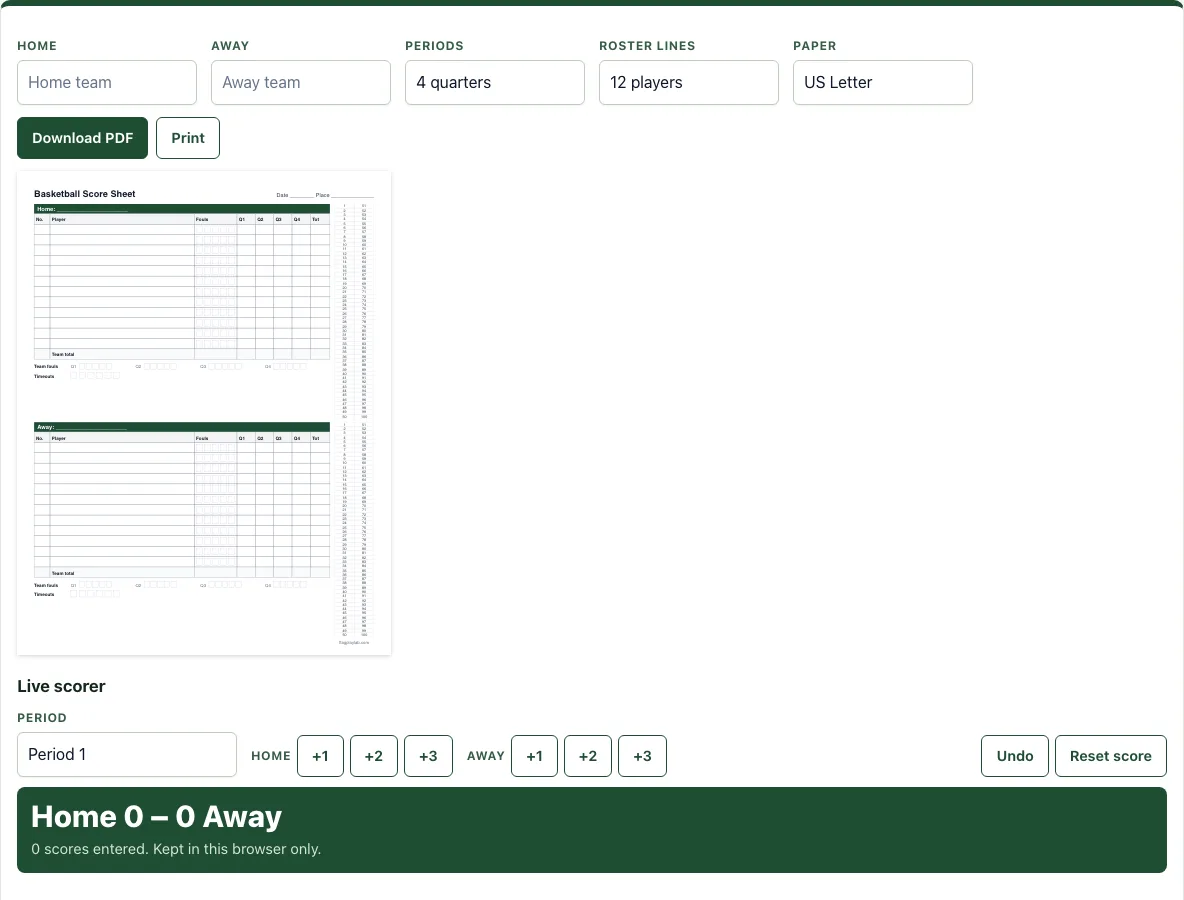
How to use the Basketball Score Sheet
- Type the Home and Away team names.
- Choose Periods: 4 quarters or 2 halves.
- Choose Roster lines: 10, 12 or 15 players.
- Choose Paper: US Letter or A4.
- Check the preview to see the full sheet before you print.
- Use the live scorer under the sheet. Pick the Period, then press +1, +2 or +3 for Home or Away each time a team scores.
- Press Undo to reverse a mistake, or Reset score to start the score again.
- Click Download PDF to save the sheet, or Print to send it to your printer.
Printing gives you a paper copy that you can write on during the game, which is useful if you want to fill in the boxes by hand. The live scorer shows the score and points by period, and it is kept in this browser only, so it will not appear on another device. Download the PDF if you want a copy to share or keep.
The sheet is drawn for the paper size you choose, and the running score strip runs from 1 to 100 for each team on the right-hand side. The live score is kept in this browser until you press Reset score.
Team names appear in the roster headers of the printed sheet.
How do you keep score in basketball?
Each made basket adds points to the team that scored. A free throw is worth 1 point, a basket from inside the arc is worth 2 points, and a basket from beyond the arc is worth 3 points. The team with more points at the end of the game wins.
A running score is a record of every scoring play in order. On the score sheet, each time a team scores, cross off the next numbers on its strip, two numbers for a 2-point basket, and write the player’s number next to them. The strip runs from 1 to 100, so the last crossed-off number always matches the current score. If you miss a scoring play, the strip shows the gap right away, and you can check the team total against the points written in each period.
Keep the points for each period in the period boxes too. This lets you see how the game developed quarter by quarter or half by half, not only the final result.
What goes on a basketball score sheet?
A basketball score sheet records the teams, the players, the points, the fouls and the stoppages in one place. It starts with a header that has lines for the date and the place of the game. Below that, each team has its own roster table.
The roster table lists each player’s number and name. Next to each player are five foul boxes; the number of fouls before a player must leave depends on your league, so mark the limit before tip-off. The same table has columns for points in each period, labelled Q1 to Q4 for quarters or H1 and H2 for halves, plus a Tot column for each player. A Team total row adds up the scoring for the whole team.
Outside the rosters, the sheet has team foul boxes for each period, which track how many fouls the team has committed. It also has six timeout boxes, so you can mark each timeout as it is called. The running score strip runs from 1 to 100 and sits on the page for the whole game.
Frequently asked questions
Is it free and do I need an account?
Yes, the tool is free and needs no sign-up. It runs in your browser, and nothing you enter is uploaded.
Can I print it or save it as a PDF?
Yes. Choose US Letter or A4 paper, then click Print to send the sheet to a printer or Download PDF to save it as a file. The sheet is designed to fit on one page.
Does it work on a phone or tablet?
Yes. The buttons are large enough to tap on a phone during a game, and everything stays in that phone’s browser.
How do you track fouls?
Each player has five foul boxes. Mark one box each time that player commits a foul, and check your league’s foul-out limit so you can warn the coach in time. Track team fouls separately in the team foul boxes for each period, so you can see how many fouls the team has committed in the current quarter or half.
Where is my live score kept?
The live scorer keeps its score in this browser only. It is not sent to a server, so use the printed sheet or the downloaded PDF if you need a permanent record.
Can I use what I make here commercially?
Yes. Sheets, cards, diagrams and PDFs you make with this tool are yours to print, hand out, sell or put in your own products, such as a coaching book on KDP or a printable on Etsy, with no credit needed. You may not copy the tool or the site itself; see the terms.
Related tools
- Basketball stat tracker: Use it when you want to record more than the score, such as individual player statistics.
- Basketball rotation generator: Use it when you need to plan how players rotate in and out during a game.
- Basketball plays: Use it when you want to look up or review set plays for your team.
- Basketball court diagram: Use it when you need a labelled court to explain positions or plays.
- Basketball playbook: Use it when you want to organise your team’s plays in one place.
- Basketball whiteboard: Use it when you want to draw out a play or a tactic during practice or a timeout.