
Basketball Stat Sheet
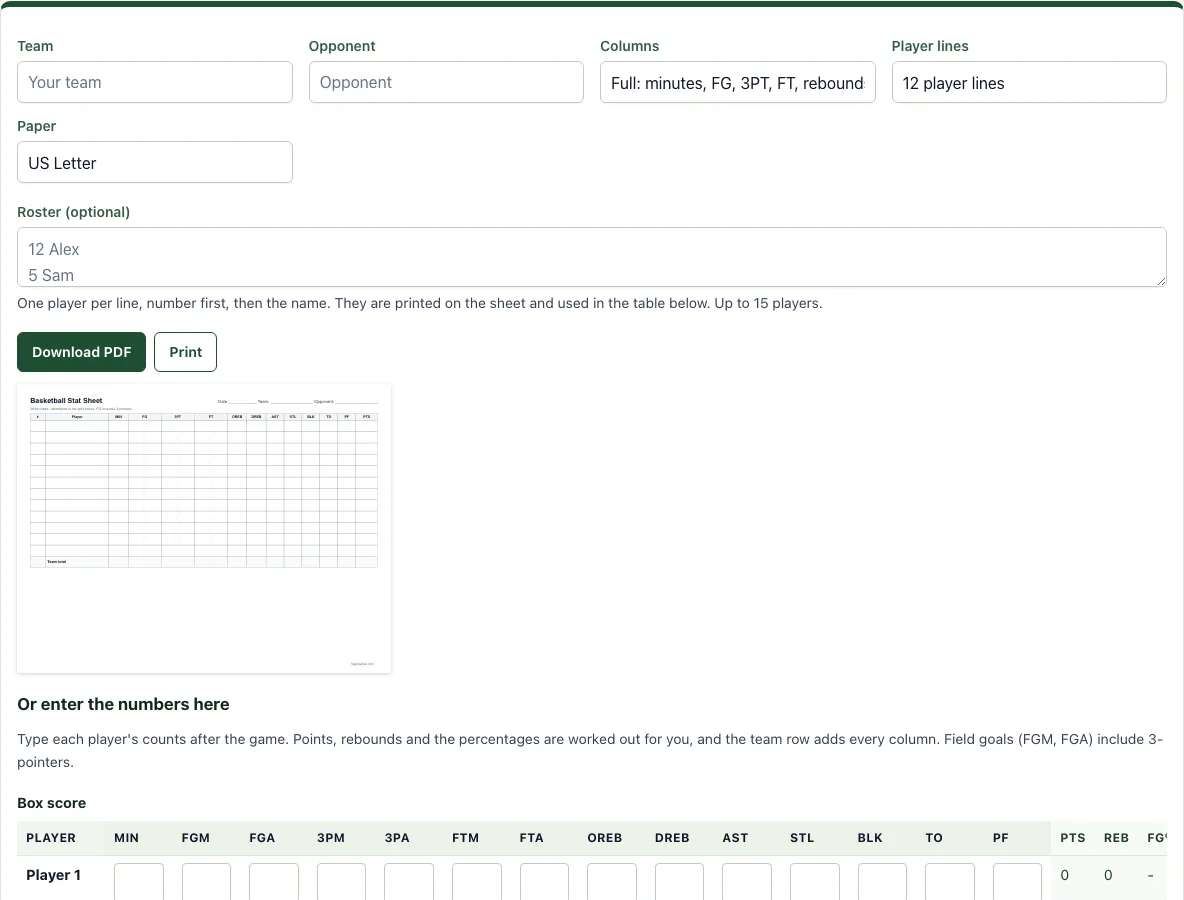
Print a game stat sheet for your roster, or type the counts after the game and get points and shooting percentages.
Free · runs in your browser · nothing is uploaded
Recent
Your last 10 settings, saved only in this browser. Nothing is uploaded.
How to use the Basketball Stat Sheet
- Type your team name and the opponent. Both are optional and are printed in the header.
- Choose the columns: Full has minutes, FG, 3PT, FT, offensive and defensive rebounds, assists, steals, blocks, turnovers, fouls and points. Simple keeps FG, 3PT, FT, rebounds, assists, steals, turnovers, fouls and points.
- Choose 10, 12 or 15 player lines and Letter or A4 paper.
- Optional: type your roster in the Roster box, one player per line with the number first, for example “12 Alex”. The numbers and names are printed on the sheet.
- Press Download PDF to save the sheet, or Print to send it to your printer. The sheet is landscape and fits one page.
- After the game, type each player’s counts in the table under “Or enter the numbers here”. The PTS, REB, FG%, 3P%, FT% and eFG% columns fill in as you type, and the last row adds up the team.
- Press Download CSV to open the numbers in a spreadsheet, or Print to print the table. Clear numbers starts a new game.
Your roster and the numbers you type are saved in this browser on this device only. They are not sent to a server, so download the CSV if you need a copy to keep.
What goes on a basketball stat sheet?
A basketball stat sheet lists every player on the team and a column for each thing you want to count. The usual columns are minutes played, field goals made and attempted (FG), three-pointers made and attempted (3PT), free throws made and attempted (FT), offensive and defensive rebounds, assists, steals, blocks, turnovers, personal fouls and points. Write a stroke or a number in the box each time the thing happens, and add the boxes up at the end of the game.
The field goal column counts every shot except free throws, and that includes three-pointers. A player who makes two 2-pointers and one 3-pointer on four attempts has made 3 of 4 field goals and 1 of 1 three-pointers. This is why the sheet prints FG and 3PT as separate boxes, and why the table below the sheet checks that the three-pointers never outnumber the field goals.
How are points and eFG% worked out from the counts?
Points are 2 for every made field goal, plus 1 more for every made three-pointer, plus 1 for every made free throw. Take 5 field goals made on 11 attempts, 2 of them from three on 5 attempts, and 3 free throws made on 4 attempts. Points = 2 x 5 + 2 + 3 = 15. Field goal percentage is 5 / 11 = 45.5%, three-point percentage is 2 / 5 = 40% and free throw percentage is 3 / 4 = 75%.
Effective field goal percentage (eFG%) gives a made three-pointer 1.5 times the credit of a made two: eFG% = (FGM + 0.5 x 3PM) / FGA. For the same player that is (5 + 1) / 11 = 54.5%. It is the number to look at when two players have the same FG% but one of them takes more threes.
Who keeps the stats during a game?
Ask a parent, an assistant coach or a bench player to keep the sheet, and keep it simple the first few games. Track made and missed shots and fouls first, then add rebounds and turnovers. If you would rather tap than write, the basketball stat tracker records the same numbers live on a phone.
Frequently asked questions
Is the basketball stat sheet free and do I need an account?
Yes, it is free and needs no sign-up. Nothing you type is uploaded.
Can I print it or save it as a PDF?
Yes. Press Print for your printer or Download PDF to save the file. The sheet is landscape and fits one page on Letter or A4.
How many players can I list?
The sheet has 10, 12 or 15 player lines. The roster box takes up to 15 players.
What does FG include?
FG counts every field goal attempt and make, including three-pointers. Free throws are counted separately in FT.
Are my numbers saved?
They are kept in this browser on this device. Download the CSV before you clear the browser data or switch devices.
Can I use it for youth, school or club games?
Yes. The columns are the same at every level. Use the Simple columns for young players and the Full columns when you also want minutes and rebound types.
Can I use what I make here commercially?
Yes. Sheets, cards, diagrams and PDFs you make with this tool are yours to print, hand out, sell or put in your own products, such as a coaching book on KDP or a printable on Etsy, with no credit needed. You may not copy the tool or the site itself; see the terms.
Related tools
- Basketball stat tracker: Use it to tap each action live and let the box score add itself up.
- Basketball score sheet: Use it for the running score, team fouls and timeouts of one game.
- Basketball rotation generator: Use it to plan equal minutes before the game.
- Basketball scouting report template: Use it to prepare for your next opponent.
- Basketball tryout evaluation form: Use it to score players at tryouts.
- Basketball practice plan template: Use it to plan the next practice.