
Basketball Stat Tracker
Tap a player, then what happened, and the box score adds itself up. Export it as CSV.
Recent
Your last 10 settings, saved only in this browser. Nothing is uploaded.
A basketball stat tracker records what each player does in a game and totals it for you. This one is free, runs in your web browser, and needs no sign-up. You enter the roster, tap each action as it happens, and the box score updates with points, field goals, field goal percentage, 3-pointers, free throws, rebounds, assists, steals, blocks, turnovers and fouls. It works as a basketball stat sheet for one game at a time, and the Team row adds up every player’s numbers so you can see the whole team’s totals at a glance.
It works on any phone, tablet or laptop.
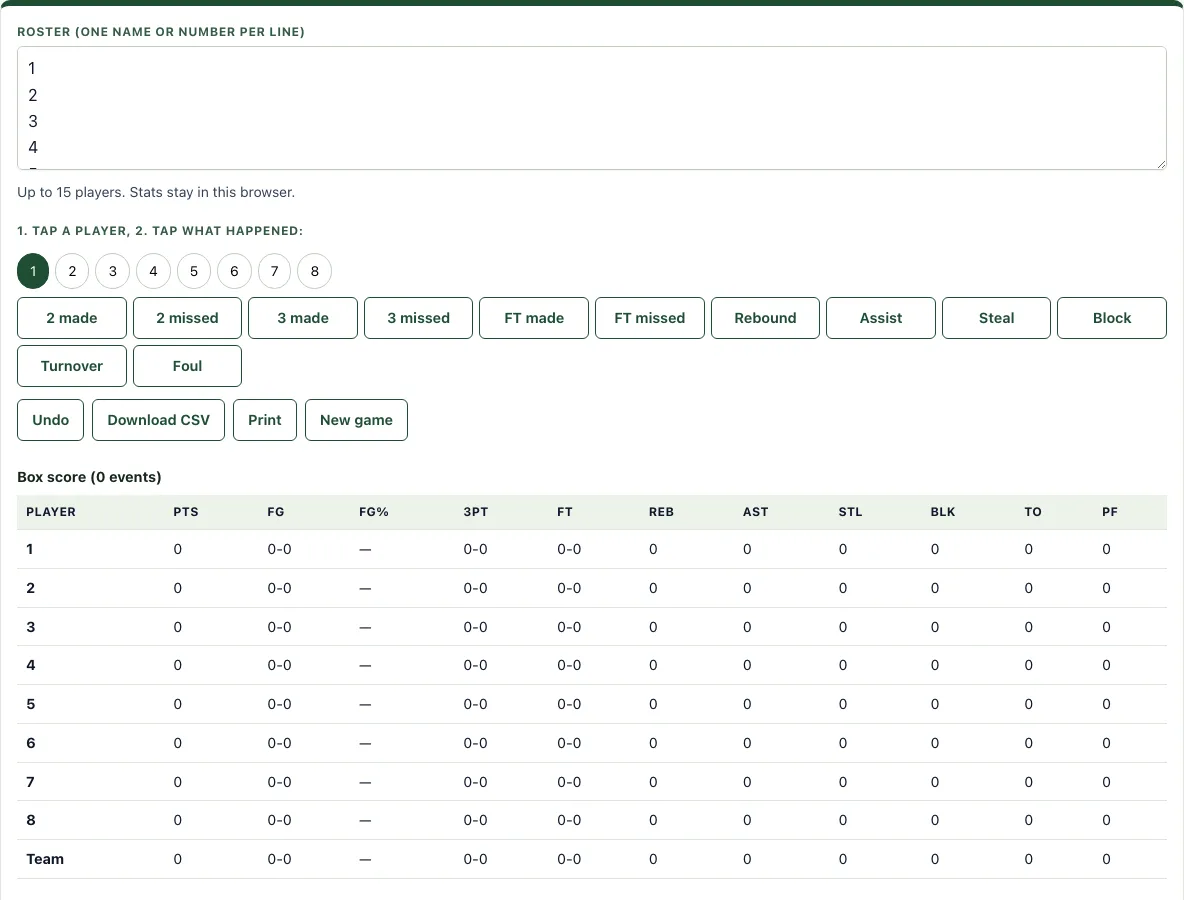
How to use the Basketball Stat Tracker
- Open the roster box and type one name or number per line. You can add up to 15 players.
- Tap a player to select them.
- Tap the action that happened: 2 made, 2 missed, 3 made, 3 missed, FT made, FT missed, Rebound, Assist, Steal, Block, Turnover or Foul.
- Repeat steps 2 and 3 for every play. The box score table updates the player’s row and the Team row after each tap.
- If you tap the wrong action, press Undo to reverse the last entry.
- Check the box score table during and after the game. Each row shows PTS, FG (made-attempted), FG%, 3PT, FT, REB, AST, STL, BLK, TO and PF.
- When the game is over, press Download CSV to save the numbers as a file, or press Print to make a paper copy.
- Press New game to clear the stats and start a fresh box score.
The selected player stays highlighted until you tap another one, so several events for the same player only need one tap each. Fouls, turnovers and the other counts appear in the box score at once.
Every tap is saved in this browser at once, so a page reload during the game loses nothing.
How do you track basketball stats?
Track basketball stats by recording every action the moment it happens and linking it to the player who did it. Each made shot, missed shot, rebound, assist, steal, block, turnover and foul gets one entry, and the totals are added up from those entries.
Points come from made shots only. A made 2-pointer is worth 2, a made 3-pointer is worth 3, and a made free throw is worth 1. Misses do not score, but they still matter because they are needed to work out shooting percentages. Tracking a miss as well as a make tells you how often a player takes a shot and how often it goes in.
Here is how the tool adds up one example: a 2 made, a 2 missed, a 3 made, and a free throw made with one free throw missed. That gives 6 points (2 + 3 + 1). The field goals are 2-3, the 3-pointers are 1-1, and the free throws are 1-2.
How is field goal percentage calculated?
Field goal percentage equals made field goals divided by attempted field goals, multiplied by 100. Three-pointers count as field goals, and free throws are kept separate.
Using the example above, the player made 2 of 3 field goal attempts (the 2-pointer and the 3-pointer were made, and the other 2-pointer was missed). So the calculation is 2 ÷ 3 × 100, which is 66.7%. The 3-pointer is included in the 3 attempts, which is why the 3PT column shows 1-1 separately. The free throws are not part of this number. Their own percentage is 1 ÷ 2 × 100, which is 50%.
Rebounds, assists, steals, blocks and turnovers are simple counts: one tap adds one.
How do I track stats if I am also coaching?
Ask a parent or a bench player to keep the phone. Track only points and fouls at first, then add rebounds and turnovers once the scorer is quick with the buttons. The CSV after each game lets you add up season totals in a spreadsheet.
Frequently asked questions
Is it free and do I need an account?
Yes, the tool is free and needs no sign-up. Nothing you enter is uploaded. Stats stay in your browser on this device, so use Download CSV if you want a copy to keep.
Can I print it or save it as a PDF?
Yes. Press Print to open your browser’s print options for the box score. To save a PDF, choose a save-as-PDF option in that print dialog.
Does it work on a phone or tablet?
Yes. The buttons are large enough to tap on a phone during a game, and everything stays in that phone’s browser.
How many players can I track?
You can enter up to 15 players, one name or number per line in the roster box.
Are my stats saved if I close the page?
Stats stay in the browser on this device. If you want the numbers in a separate file, press Download CSV before you close the page.
What is in the CSV file?
One row per player with points, field goals made and attempted, 3-pointers, free throws, rebounds, assists, steals, blocks, turnovers and fouls. It opens in any spreadsheet.
Can I track two teams?
Track one team per browser tab, or list both rosters in one box, for example with H and A before the numbers.
Related tools
- Basketball score sheet: Use it when you need to record the running score and game details alongside your stats.
- Basketball rotation generator: Use it to plan how minutes are shared among your players before a game.
- Basketball plays: Use it to look at and set up set plays for your team.
- Basketball playbook: Use it to organize your team’s plays into one collection.
- Basketball whiteboard: Use it to draw out a play or a drill and show it to your team.
- Basketball court diagram: Use it when you need a court layout to mark positions or shot locations.