
Basketball Whiteboard
A chalkboard court for drawing with your finger, mouse or pen. Full screen on a tablet.
Recent
Your last 10 settings, saved only in this browser. Nothing is uploaded.
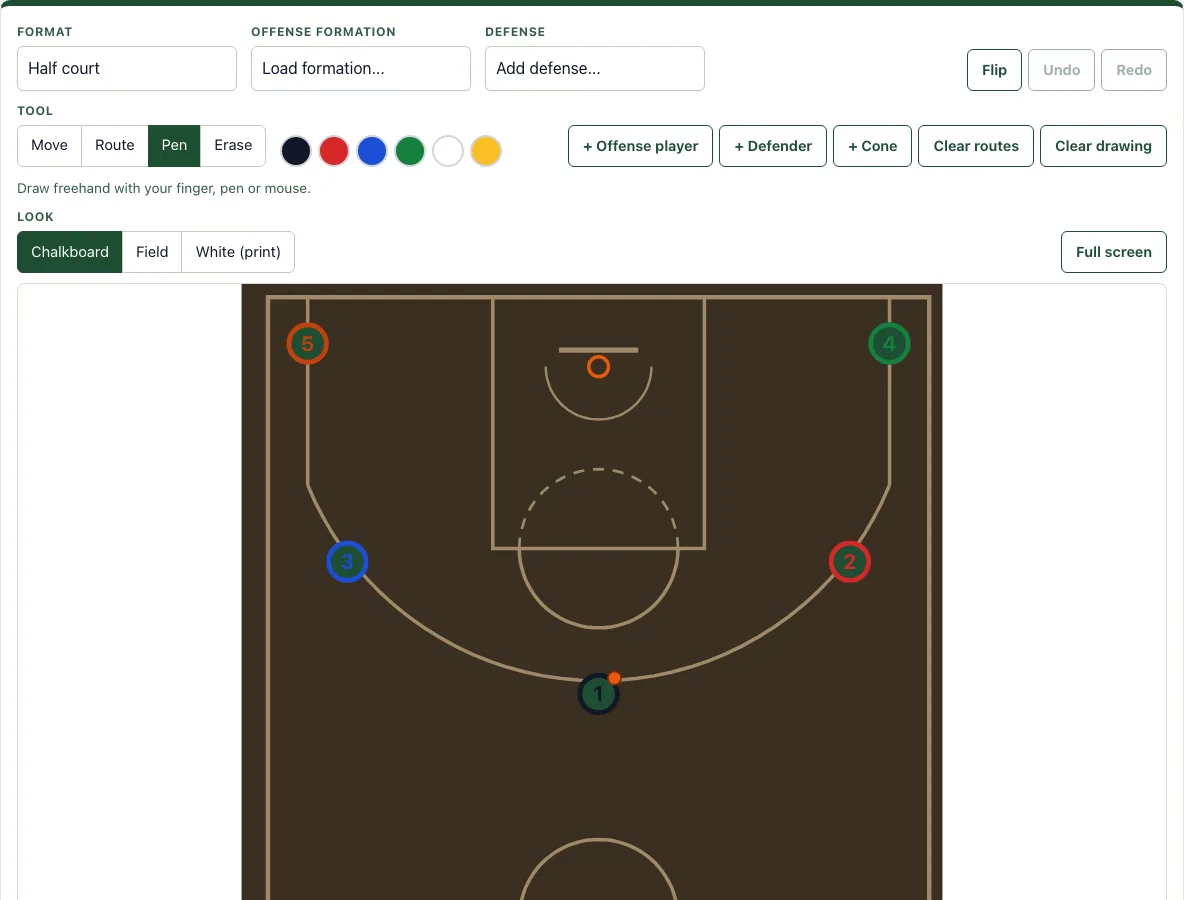
How to use the basketball whiteboard
- Set the court. In Format, choose Half court or Full court.
- Pick the offense. In Offense formation, choose a set such as 5-out, Horns or 1-4 high. For inbounds plays, choose Box, Stack or Line.
- Pick the defense. In Defense, choose Man to man, 2-3 zone, 3-2 zone, 1-3-1 zone or Box and 1.
- Add players. Use + Offense player, + Defender or + Cone. Tap a player to select it, then give it a label of up to 3 characters and a color. Its routes take the same color.
- Draw a route. Choose Route, tap a player, then tap where the route goes. Double-tap or press Enter to finish, or press Esc to cancel.
- Adjust. Choose Move to drag players. Tap a route to select it, then drag its yellow points to reshape it.
- Sketch freely. Choose Pen and a color for freehand drawing. Clear drawing removes the drawing and keeps the players.
- Remove items. Choose Erase and tap a player, route or drawing. You can also select a player or line and press Delete or Backspace.
Ctrl or Cmd+Z undoes a change; Ctrl+Y redoes it. Switch Look between Chalkboard, Field and White, or use Full screen for a larger view. When the play is ready, use Save in this browser, Copy link, PNG image, SVG, Download PDF (one play per page with the notes), Print, or Add to a playbook. New play starts a blank board, and the Saved in this browser list opens or deletes saved plays.
How do coaches use a basketball whiteboard?
Coaches use a basketball whiteboard to show each player exactly where to go before a possession, so everyone sees the same spacing and timing. A diagram makes it easier to explain why a cut opens a passing lane or why a screen frees a shooter.
Offensive players are numbered 1 to 5, starting with 1 for the point guard and ending with 5 for the center. Defenders are marked X1 to X5 to match their assignments, and an orange dot shows where the ball is. Each line type has a meaning. A Cut is a solid arrow for a player moving without the ball. A Dribble is a zigzag arrow, a Pass is a dashed arrow, a Screen is a line ending in a T, and a Handoff shows the ball moving between players.
Formations control spacing. A 5-out set places all five players around the arc, which creates room for drives into the lane. Horns puts two big players at the elbows, and Box places four players around the lane. On defense, man to man assigns each defender to one offensive player, while a zone such as 2-3 gives each defender an area to guard.
Can I draw on a full court?
Yes. Set Format to Full court to draw on a full-length floor. The court is drawn from the NBA court diagram, at 94 by 50 feet. Its lane is 16 feet wide, the free-throw line is 15 feet from the backboard, the three-point line is 23 feet 9 inches from the basket (22 feet in the corners), and the restricted area is 4 feet.
These measurements matter when you check whether a play is realistic. You can see whether a pass crosses the arc or whether a cutter reaches the rim in the time you expect. The full court is the best setting for transition plays and for drawing a press. Use Box, Stack or Line in Offense formation to diagram inbounds plays.
Frequently asked questions
Can I use it on an iPad during a game?
Yes. It runs in the tablet’s browser with no app to install. Press Full screen so the court fills the screen, and use the Chalkboard look for contrast in a bright gym.
Is it free and do I need an account?
The tool is free and needs no sign-up. It runs in your browser, and nothing you draw is uploaded.
Can I print it or save it as a PDF?
Yes. Download PDF creates one play per page, with the notes included. You can also use Print, or save the diagram as a PNG or SVG file.
Does it work on a phone or tablet?
Yes. Draw with your finger or a stylus, and press Full screen to make the field fill a tablet screen on the sideline.
Can I edit a play from the play library?
Yes. Every play in the basketball play library has an Open in the designer link, which loads it into the basketball play designer: the same board with the field look and numbered actions.
Where are my saved plays kept?
Plays saved with Save in this browser stay in browser storage on the device you used. To rebuild the same play on another device, use Copy link, which creates a link that restores the exact play.
Related tools
- Basketball play designer for building a full play step by step with more detailed editing.
- Basketball plays for browsing ready-made plays and opening them to edit.
- Basketball court diagram for checking court markings and measurements before you draw.
- Basketball playbook for organizing your plays into a collection for a team or season.
- Football whiteboard for drawing football plays and routes on a field.
- Inbound plays for setting up out-of-bounds plays from the baseline or sideline.