
Football Playbook Maker
Pick your plays, choose how many per page and download a printable playbook PDF.
Recent
Your last 10 settings, saved only in this browser. Nothing is uploaded.
How to use the Football Playbook Maker
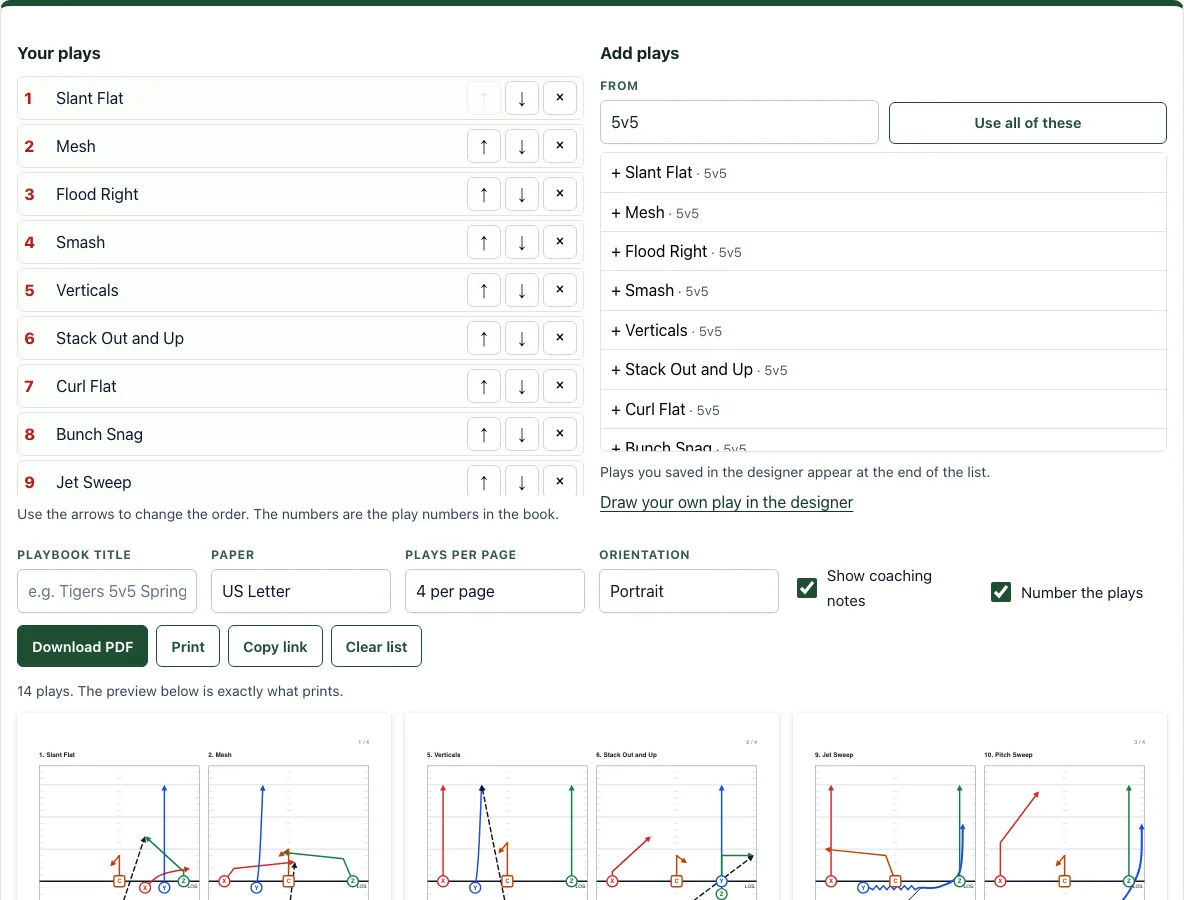
- Open the From list and pick a format such as 5v5 or 11-a-side, or choose flag defenses. The page starts on 5v5.
- In the Add plays list on the right, press the + button next to each play you want. To replace your list with every play in that group at once, press Use all of these.
- Check the Your plays list on the left. Use the up and down buttons to change a play’s position, and use the remove button to take it out.
- Type a Playbook title. Then choose Paper (US Letter or A4), Plays per page (1, 2, 4, 6, 9 or 12) and Orientation (portrait or landscape).
- Tick Show coaching notes to print notes under each play, and tick Number the plays to print play numbers.
- Look at the preview below the buttons. It shows exactly the pages that print, and each page has the title, a page number, and each play with its number, name and notes.
- Press Download PDF to save a vector PDF that stays sharp at any size, or press Print to send the pages to a printer.
Press Copy link to get a link that rebuilds the whole playbook, so you can share it with someone else. Press Clear list to empty your list and start again. Your list is remembered in this browser for next time.
How do I make a playbook for my team?
Start by choosing the format your team plays, then choose the plays that match it. Each play is drawn for a set number of players, so a 5v5 play uses five players per side and an 11-a-side play uses eleven. Setting the format first keeps the library focused on plays your players will actually run.
Once the plays are in your list, put them in the order you teach or call them. A numbered list makes it easy for players to refer to a play by number, and short notes help when a play has a key rule, such as the first read or where the ball goes. Keep the notes brief, because a playbook is easier to use when each play fits in a glance.
How many plays should a youth playbook have?
The tool does not set a limit, and no single number works for every team. The right amount is the number your players can learn and recall in practice. A smaller playbook is usually easier for young players to memorise, so start with the plays you will use most often.
The number of pages depends on two settings: the total number of plays and the Plays per page setting. Divide the total by the plays per page and round up. For example, 14 plays at 4 per page make a 4-page playbook. Choosing fewer plays per page gives each play more space, while choosing more per page makes a shorter document.
Can I add my own plays?
Yes. Draw the play in the play designer, then press Save in this browser. The saved play appears at the end of the Add plays list, where you can press the + button to add it to your playbook.
Saved plays are stored in your browser only, so they stay on the device you drew them on. To move a play to another phone, tablet or computer, open it in the designer and send yourself its Copy link link.
Frequently asked questions
Is it free and do I need an account?
Yes, the tool is free, and you do not need to sign up. It runs in your browser, and nothing is uploaded.
Can I print it or save it as a PDF?
Yes. Download PDF creates a vector PDF that stays sharp at any size. Print sends the pages shown in the preview to your printer. Choose your paper size and orientation before you do either, so the pages fit correctly.
Does it work on a phone or tablet?
Yes. The lists, settings and preview stack on a narrow screen, and the PDF opens in your phone’s PDF viewer for printing.
What happens to my playbook when I come back later?
Your list is remembered in this browser, so the plays you added will still be there the next time you open the page on the same device. If you clear your browser storage or use a different device, use Copy link to rebuild the playbook from a saved link.
Can I mix flag and tackle plays in one playbook?
Yes. Change From between formats and add plays from each. Most coaches keep one book per team, though, because each format uses its own field width and player count.
Can I use what I make here commercially?
Yes. Sheets, cards, diagrams and PDFs you make with this tool are yours to print, hand out, sell or put in your own products, such as a coaching book on KDP or a printable on Etsy, with no credit needed. You may not copy the tool or the site itself; see the terms.
Related tools
- Football play designer - Draw your own plays, then save them to add to a playbook.
- Flag football playbook PDF - Build a playbook for flag football teams.
- Wristband template - Make a small reference card with your key plays for players to carry.
- Play call sheet - Create a sheet to list the plays you will call during a game.
- All flag football plays - Browse the flag football plays to pick from.
- Youth football plays - Find plays suited to younger players.
- Basketball playbook - Make a playbook for basketball instead.