
Football Whiteboard
A chalkboard field for drawing plays with your finger, mouse or pen. Full screen on a tablet.
Recent
Your last 10 settings, saved only in this browser. Nothing is uploaded.
A football whiteboard is a free, browser-based tool for drawing football plays. You place players on a field, draw routes and blocks, add defenders and cones, and check the play against rules. It needs no sign-up, and nothing you draw is uploaded.
Coaches can use it as a football coaching whiteboard at practice, or as an online football whiteboard for planning a play at home. The page opens ready to draw, with a chalkboard-style field, the Pen tool selected, and a 7v7 spread formation already on the field. You can switch to a 4v4, 5v5, 6v6, 7v7, 8v8 or 11-a-side format at any time.
Plays you save with Save in this browser stay on the device you used.
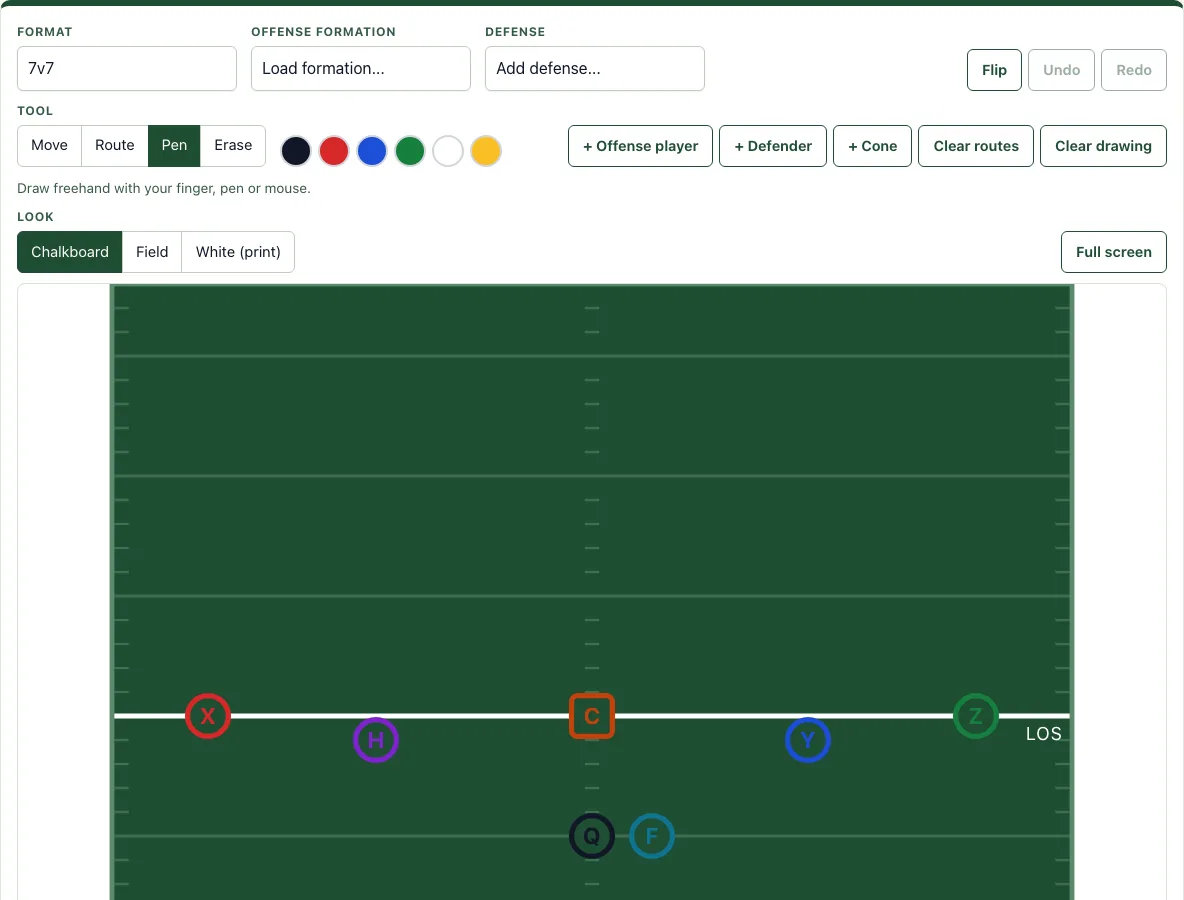
How to use the Football whiteboard
- Pick a Format above the field, such as 7v7 or 11-a-side.
- Open Offense formation and choose a starting setup such as Spread, Trips or Shotgun with a back. The list changes for 11-a-side.
- Open Defense and add a defense such as Cover 2 or 1-3-1 zone.
- Use Move to drag players into place. To change a route, tap it to select it, then drag its yellow points.
- Press + Offense player, + Defender or + Cone to add more pieces.
- Select Route, tap a player, then tap where the route should go. Double-tap or press Enter to finish, or Esc to cancel.
- When you draw a line, pick its type: Route, Run, Motion (zigzag), Pass (dashed), Pitch (dashed), Handoff or Block (ends in a T). Select a line to change its end to Arrow, T, Dot or None.
- Select a player to give it a label of up to 3 characters and a color. Its routes take the same color.
- Type a Play name and Coaching notes under the field, then read the rule check.
- Press Save in this browser.
Use Flip to mirror the play left to right. Ctrl or Cmd+Z undoes, Ctrl+Y or Shift+Ctrl+Z redoes, and Delete or Backspace removes a selected player or line. When the play is ready, Copy link gives you a link that rebuilds the exact play. PNG image, SVG, Download PDF and Print export it.
How do coaches use a whiteboard?
Coaches use a football whiteboard to show players where to go before a snap, so everyone sees the same picture. The field stands in for the real one, and each player and line marks one assignment. A coach can draw a play, talk it through, change one route, and draw it again in seconds.
Line types carry meaning. A solid line is a route or run, a dashed line is a pass or pitch, a zigzag is motion, a line ending in a T is a block, and a thin line from the quarterback is a handoff. Coaching notes let you write reads and reminders beside the play.
Can I use it on an iPad on the sideline?
Yes. The tool runs in the browser on a tablet. Turn on Full screen to let the field fill the screen, which suits a tablet on the sideline or a projector in a meeting room.
For quick markups, use the Pen tool with the black, red, blue, green, white or yellow swatches. Pen ink sits on top of the field, so you can mark up a formation without moving any players.
How do I clear the board?
Clearing depends on what you want to remove. Clear routes removes all routes and keeps the players. Clear drawing removes the freehand ink and keeps the players.
To remove a single item, choose Erase and tap a player, route or drawing. You can also select an item and press Delete or Backspace. If you clear something by mistake, press Undo.
Can I switch between the chalkboard and a white board?
Yes. Look has three settings: Chalkboard (dark green with white ink), Field (light green) and White (print). Your choice is remembered in this browser. A phone works well for small changes, such as moving one player or adjusting one route; a tablet in Full screen gives you room to draw whole plays in front of the team.
Frequently asked questions
Is it free and do I need an account?
Yes. The tool is free, needs no sign-up and runs in your browser. Nothing you draw is uploaded.
Can I print it or save it as a PDF?
Yes. Download PDF creates one play per page with its coaching notes. Print sends the play to your printer, and Download PDF and Print always use a clean white field. PNG image and SVG save the play as images.
What does the rule check look for?
The rule check lists problems against the NFL FLAG 5v5 rules. It flags more than one forward pass, the quarterback running across the line, blocking, handoffs beyond the line, a center not on the line, more than 4 players on the line, more than one player in motion or motion toward the line, and more than 2 rushers or rushers closer than 7 yards. For 11-a-side, it checks for at least seven players on the line.
Are my saved plays private?
Plays saved with Save in this browser stay on the device you used, in browser storage. Open the Saved in this browser list to open or delete them.
Can I edit a play from the play library?
Yes. Every play in the play library has an Open in the designer link that loads it here, where you can edit it.
Related tools
- Football play designer - Use this when you want the full designer for building and editing plays.
- Basketball whiteboard - Use this when you coach basketball and need a court to draw on.
- Blank play template - Use this when you want an empty field to sketch a play by hand or print one.
- Football play maker - Use this when you want to create a new play from scratch.
- All flag football plays - Use this when you want to browse existing plays to copy or edit.
- Practice plan generator - Use this when you need to plan a full practice around the plays you have drawn.