
Basketball Inbound Plays
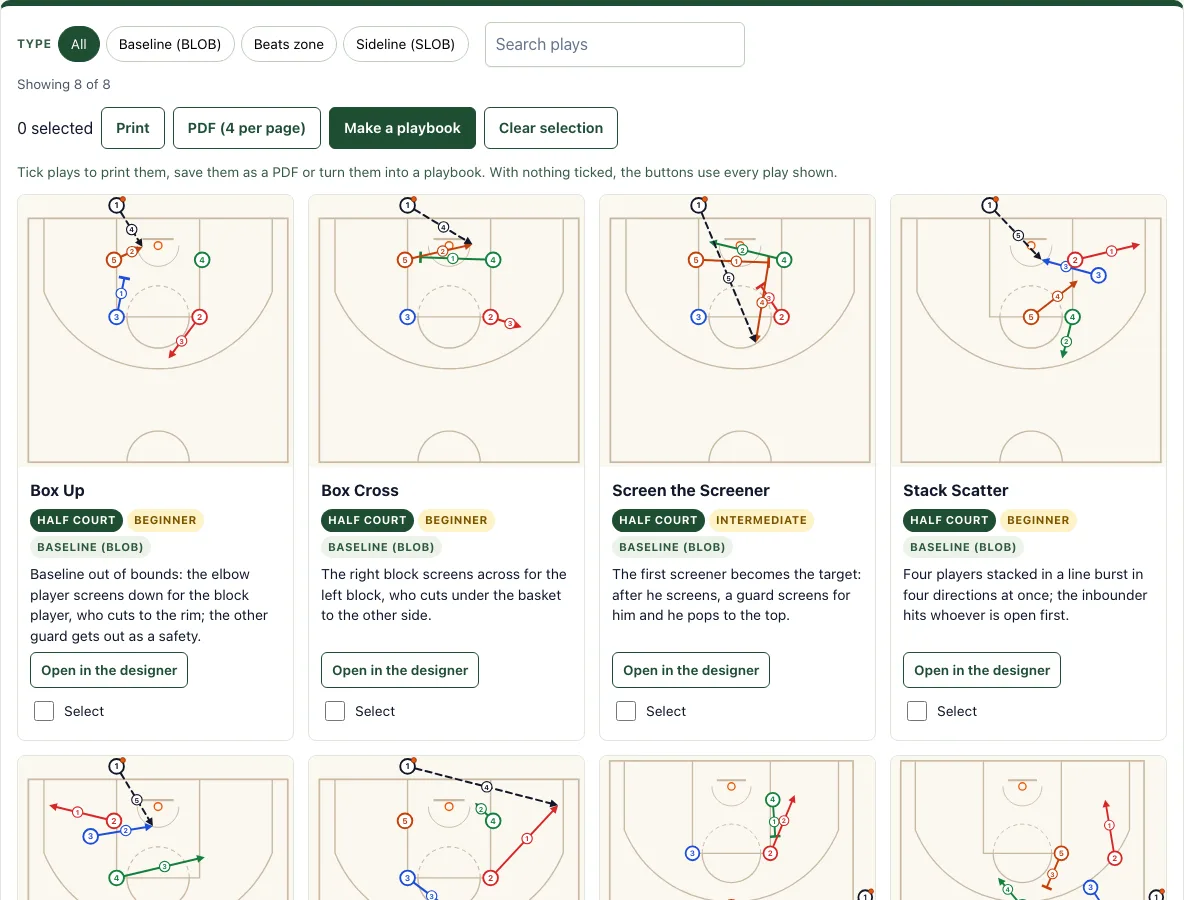
8 baseline and sideline out-of-bounds plays with numbered diagrams. Print them or edit any one.
Box Up
Baseline out of bounds: the elbow player screens down for the block player, who cuts to the rim; the other guard gets out as a safety.
Box Cross
The right block screens across for the left block, who cuts under the basket to the other side.
Screen the Screener
The first screener becomes the target: after he screens, a guard screens for him and he pops to the top.
Stack Scatter
Four players stacked in a line burst in four directions at once; the inbounder hits whoever is open first.
Line Scatter
The same idea from a line along the lane: corner, rim, opposite elbow and the top as a safety.
Box Corner (vs Zone)
Against a zone, send a shooter to the corner behind the zone while the post seals inside.
Sideline Box
Sideline out of bounds: a back screen for a lob to the basket, with the top player coming to the ball as the safe pass.
Sideline Stack
Two players stacked at the wing split up and back while the post screens for the guard at the top.
Recent
Your last 10 settings, saved only in this browser. Nothing is uploaded.
This free page shows 8 basketball inbound plays for when the ball goes out of bounds, covering both baseline out of bounds (BLOB) and sideline out of bounds (SLOB) situations. The tool runs in your browser with no sign-up, so you can open a play, read its diagram and coaching note, and edit it straight away. Each play card shows the diagram with every action numbered in order, the play name, its tags and a coaching note. You can narrow the list with filters or search, then print, save as a PDF, or group chosen plays into a playbook.
Every diagram is our own drawing.
How to use the Basketball Inbound Plays Tool
- Type a word such as “box” in the search box, or tap a type button: Baseline (BLOB), Sideline (SLOB) or Beats zone. Check the count above the cards to see how many plays match.
- Read a card. It shows the diagram with numbered actions, the play name, its tags and a coaching note.
- Tick the Select box on each play you want to group. Leave the boxes empty if you want everything shown.
- Press Print or PDF (4 per page). With nothing selected, these buttons use every play shown, so filter the list first if you only want a few.
- Press Make a playbook to open the playbook maker with your selected plays.
- To change a play, press Open in the designer, then drag the players or reshape the lines.
When you open a play in the designer, the passer stands outside the line, so you can move him to the other side of the basket or to the sideline and redraw the cuts for your own set. The plays you tick stay ticked in this browser, so you can come back later and print the same set.
Every card prints with its numbered diagram and note.
What is a good baseline inbound play?
A good baseline inbound play gets the ball to an open player quickly, usually a shooter or a player moving toward the basket, while keeping one player back as a safe outlet in case the first option is covered. Because the passer stands behind the end line, the first pass should be simple and should create space near the basket.
Every play on this page keeps one player back as the safe outlet. The formation sets the shape: Box plays put four players at the elbows and blocks, Stack plays line players up one behind another, and Line plays place players in a line along the lane. Check that the passer can see the target and that the outlet is easy to reach.
What is BLOB and SLOB?
BLOB stands for baseline out of bounds, meaning the ball is inbounded from behind the baseline at either end of the court. SLOB stands for sideline out of bounds, meaning the passer is outside the sideline.
The passer’s position changes the options. From the baseline, the passer looks down the length of the court. From the sideline, the passer looks across the width. On this page, Box Up, Box Cross, Screen the Screener, Stack Scatter, Line Scatter and Box Corner (vs zone) are BLOB plays, and Sideline Box and Sideline Stack are SLOB plays.
How do you inbound against a zone?
Against a zone, the defense guards areas rather than individual players, so the inbounder looks for the gap between defenders and gets the ball into it. Box Corner (vs zone) on this page is built for this, with a player moving into the space the zone leaves open.
Use a passer who can see the whole floor and a player who can catch between zone defenders and move the ball quickly. Keep a safe outlet on the far side so the team can reset if the first pass is covered.
Frequently asked questions
Is it free and do I need an account?
Yes, the tool is free and needs no sign-up. It runs in your browser, and nothing is uploaded.
Can I print it or save it as a PDF?
Yes. Press Print to print the plays, or PDF to save them with 4 plays per page. If you select plays first, only those are included; otherwise every play shown is used.
Does it work on a phone or tablet?
Yes. The play cards stack in one column on a phone, and Open in the designer lets you change any play with your finger.
What do the small numbers on the lines mean?
They give the order of the actions: 1 happens first, then 2, and so on. In most inbound plays the screens and cuts come first and the inbound pass is the last number.
What do the symbols in the diagram mean?
Circles numbered 1-5 are offensive players, and diamonds X1-X5 are defenders. An orange dot marks the ball. Solid arrows are cuts, zigzag arrows are dribbles, dashed arrows are passes, and a line ending in a T is a screen.
Can I make my own inbound play?
Yes. Open the basketball play designer, choose Box, Stack or Line in Offense formation and move player 1 out of bounds before you draw the cuts and screens.
Related tools
- Basketball plays: Browse plays for the whole game when you want more than inbound situations.
- Basketball play designer: Draw or change a play from scratch when none of the existing diagrams fit.
- Basketball playbook: Gather your chosen plays into one document for the team.
- Basketball whiteboard: Sketch ideas freely during a practice or timeout.
- Basketball court diagram: Use a blank court when you need to mark out your own positions.
- Football play designer: Switch to this tool if you coach American football instead of basketball.